

Achieving a seamless online experience often starts with understanding how a reliable fttc connection functions within your specific household infrastructure. Fiber to the cabinet technology brings high-speed data to your neighborhood, yet the final stretch through copper wires requires careful management to prevent performance degradation. Many users struggle with inconsistent speeds because they overlook the physical configuration of their local hardware. By identifying common interference points and refining your internal setup, you can significantly enhance your stability. This guide explores the foundational adjustments necessary to ensure your internet performs at its maximum potential every single day.
Whether you are a casual browser or a power user, managing your signal path is crucial. Many households inadvertently introduce noise into their lines by placing equipment near electrical interference or using outdated cabling. Addressing these variables transforms your browsing, streaming, and gaming activities. If you are curious about professional online engagement, you must first secure a foundation that does not drop during critical tasks. We will now examine the technical steps to stabilize your line, from the master socket to wireless distribution throughout your residence.
Evaluating your current infrastructure
The first step involves auditing your physical connection points. The master socket is the most vital component, acting as the bridge between the external network and your home environment. A clean, unfiltered connection here prevents signal loss. If your setup involves messy extensions or multiple adapters, you are likely losing precious megabits before the signal even reaches your primary router.
Consider the placement of your gateway device. Routers are sensitive to physical obstacles such as thick concrete walls or dense metallic surfaces. When you position your device in an isolated corner, you force the hardware to work harder, which creates heat and slows down throughput. Keeping the router central provides the best coverage for all connected devices.
Furthermore, outdated hardware often fails to handle the bandwidth provided by modern services. Checking your firmware regularly ensures that you are utilizing the latest efficiency protocols. While looking into digital platforms for your needs, remember that software updates remain a key part of maintaining any technical system, including your local networking gear at home.
How to minimize interference for your fttc connection

Electronic noise acts as a silent killer for home internet speed. Devices such as cordless phones, microwaves, and baby monitors often broadcast frequencies that conflict with your wireless network. By shifting these devices away from your modem, you create a clearer path for data transmission. Keeping your cables organized and separated is also extremely beneficial.
High-quality shielded cabling can make a massive difference if you use wired connections for your desktop or consoles. In many ways, the attention to detail required here is similar to the procurement of hardware in other complex industries where precision is mandatory. Always opt for modern, high-grade ethernet cables to prevent data packet loss during heavy usage periods.
💡 Quick tips for signal purity
- Avoid placing routers next to electrical transformers or power bricks.
- Use the primary test socket to diagnose internal wiring issues.
- Replace aged copper extensions with high-performance cat6 wiring.
- Keep your firmware updated to leverage the latest connection optimizations.
Troubleshooting your physical line
When you experience frequent drops, the problem might reside within your home phone wiring. Old faceplates can degrade over time, leading to oxidation that disrupts the flow of digital signals. Replacing a standard faceplate with a modern filtered version is an inexpensive yet highly effective way to isolate the data signal from voice frequency interference.
If you have ever spent time analyzing system specs to understand how components interact, you will recognize that every point of resistance in your wiring adds latency. Removing unnecessary splitters or long, unshielded extension leads will drastically improve your signal-to-noise ratio. A cleaner line leads to a more consistent connection speed across all devices.
Advanced strategies for home networking


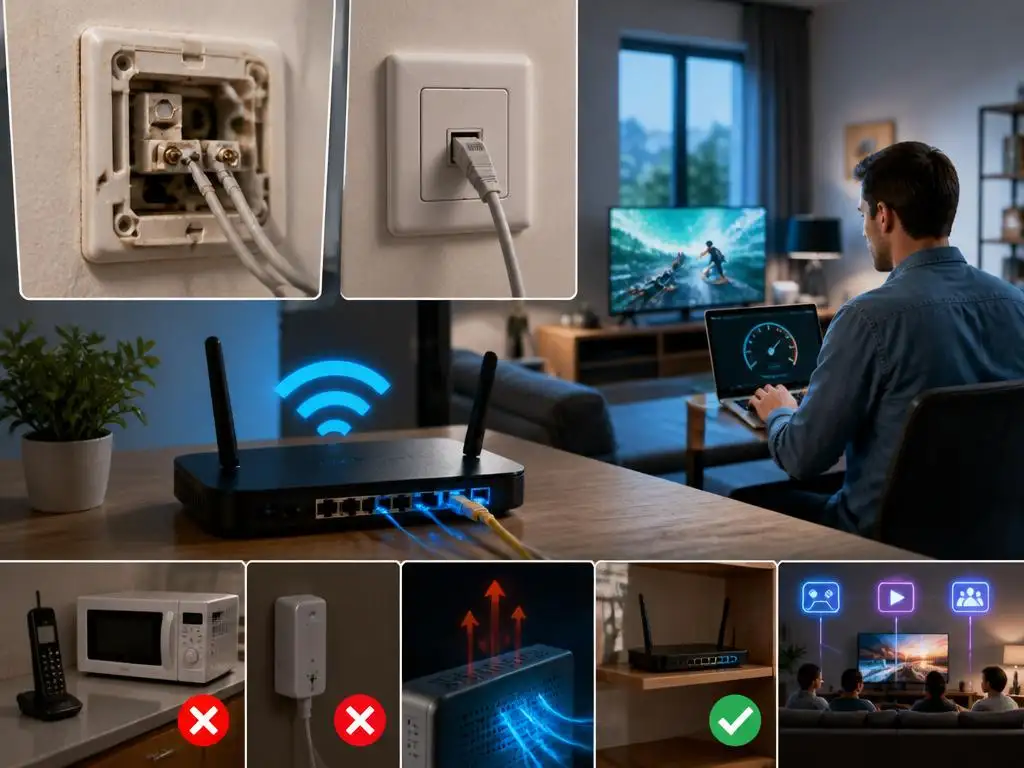
Once you have secured the incoming signal, you should optimize the local distribution. Utilizing dual-band routers allows you to segment your traffic, putting low-bandwidth tasks on the 2.4ghz channel while reserving the 5ghz or 6ghz spectrum for high-performance activities like 4k streaming or gaming. This smart traffic management reduces congestion and enhances the perceived speed of your reliable fttc connection throughout your space.
Consider the benefits of a mesh system if your residence covers a large area. Traditional single-router setups rarely cover multiple floors effectively without significant speed drops. Mesh nodes communicate wirelessly or via wired backhaul to ensure that every corner of your home receives an equal, robust signal. This modern approach to coverage eliminates those annoying dead spots that haunt many users.
Maintaining a high-quality environment for your internet equipment requires periodic review. As your household adds more smart devices, the demand on your network increases. Regularly checking your device list for unauthorized users or background-heavy applications can free up bandwidth. A proactive approach is the best way to maintain long-term stability and performance for everyone in the home.
Finally, monitor your connection using reliable speed test tools at different times of the day. This data helps you determine if your issues are localized to your home or if they correspond with peak usage times in your neighborhood. Understanding these patterns allows you to make informed decisions about bandwidth management. By following these steps, you ensure a solid performance that supports all your digital endeavors with ease and professional-grade reliability for years to come.
