
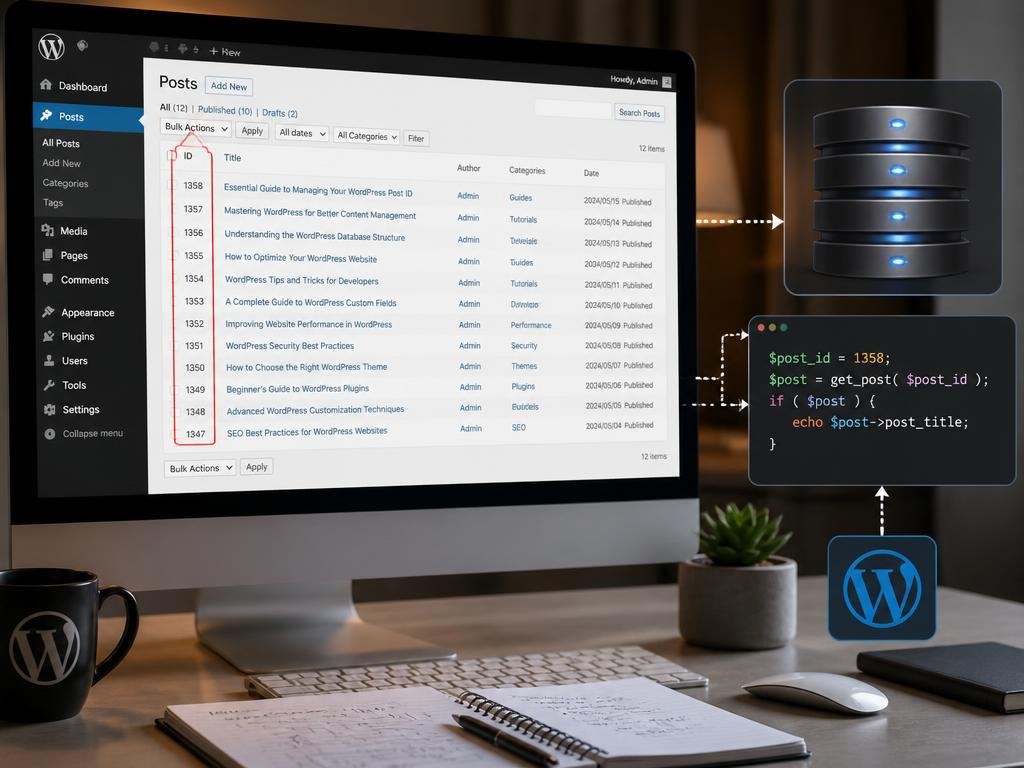
Understanding how to locate and utilize a wordpress post id is a fundamental skill for anyone managing a content-driven website. This unique numerical identifier acts as a digital fingerprint for every piece of content you publish on your platform. By mastering these identifiers, developers and site owners can streamline complex customizations, improve database queries, and simplify the integration of specific plugins or themes. Whether you are a beginner or an experienced developer, recognizing the value of these IDs will significantly enhance your workflow efficiency and help you maintain a cleaner, more organized website structure over time.
Beyond simple identification, these numbers play a critical role in how your database communicates with the user interface. When you need to troubleshoot specific display issues or modify individual page behaviors without affecting the entire site, referencing the post ID becomes indispensable. This guide explores the most practical methods to access these identifiers and provides insights into their various applications. By delving into the technical architecture of your platform, you ensure that every modification is precise, reducing the risk of errors while unlocking advanced functionalities that elevate your overall digital presence and content management strategy.
💡 Quick navigation tip
If you are struggling with device compatibility while accessing your site settings, you might find checking phone features to be a useful exercise before performing technical tasks on mobile browsers.
Why the post id remains a critical identifier
Every single post, page, or media attachment stored in your database receives an auto-incrementing numerical value by the core system. This value is permanent, ensuring that even if you change the permalink or the title of your content, the internal reference remains constant. This stability is why developers prefer relying on the ID rather than the slug when building functional elements like custom shortcodes or automated widgets.
In many scenarios, you may need to exclude specific pages from a menu or display custom fields on a single entry. Using the numeric value prevents the system from breaking if you happen to rename your content later. This reliability is the primary reason why advanced users consistently turn to the database records to manage complex site architectures and dynamic content delivery systems effectively.
📋 Core identification methods
- Hovering over the edit link in the post list dashboard.
- Inspecting the URL structure within your browser address bar.
- Using the built-in quick edit function for rapid identification.
- Installing specialized plugins that display IDs in the dashboard.
Retrieving data through the management dashboard

The most straightforward way to find the numeric identifier is directly through your administrative panel. When you navigate to the posts or pages section, simply hovering your mouse over any specific title reveals the target information in the status bar of your browser. You will notice a parameter that explicitly mentions the post value in the generated address, making it easy to copy for your current development needs.
For those who prefer a more visual approach, there are numerous lightweight plugins available in the repository that automatically add a column to your overview screen. This column lists all IDs next to their respective entries, saving you time when dealing with a large volume of content. This method is particularly effective for large teams that require frequent access to these numbers for internal reporting or administrative tasks.
The secret to effective site maintenance is not just knowing how to build content, but understanding how the underlying architecture tracks your assets. Every database record is a building block for future scaling.
Common uses for your content identifiers
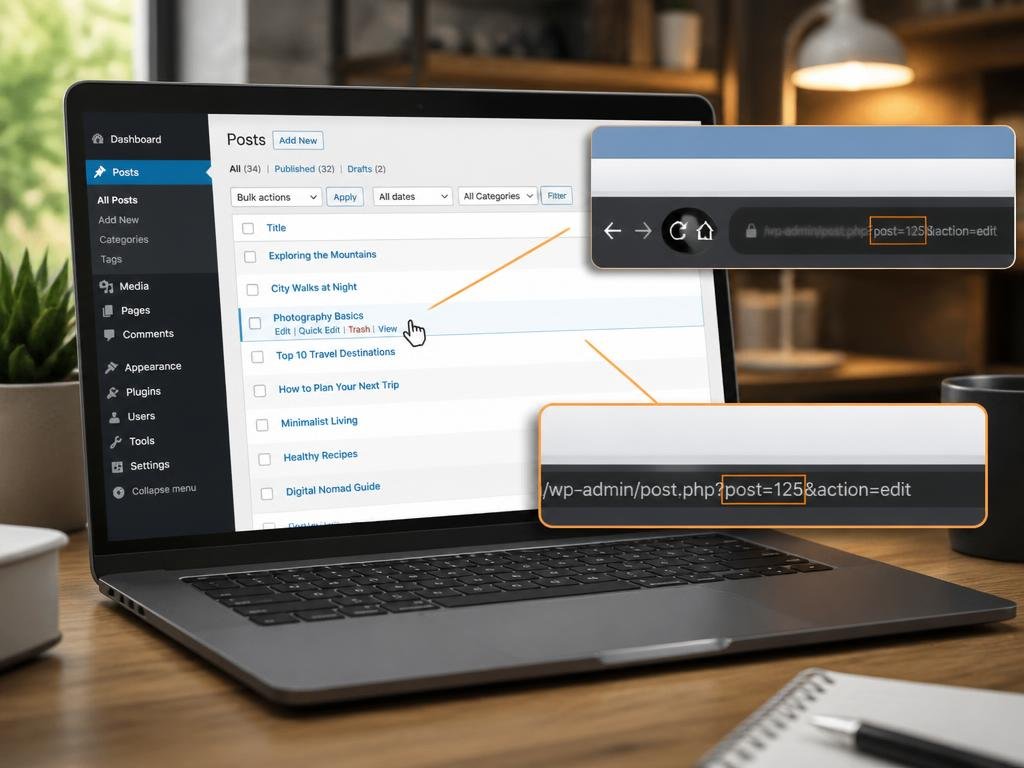
Once you have located the identifier, you can implement it in various ways to improve site functionality. For instance, many themes allow you to hide specific elements on unique pages by targeting the ID in your CSS or PHP files. This provides immense control over the visual presentation without needing to modify global styles that would otherwise impact every other part of your website consistently.
Furthermore, developers often utilize these IDs when building custom queries to fetch specific data points from the database. Whether you are creating a custom feed or trying to exclude specific content from your homepage, referencing the ID ensures your conditions are accurate. It is the most robust way to ensure that your site behaves exactly as you intended for every individual visitor.
🛠 Technical integration notes
If you are also curious about media production and capturing content, recording mobile sessions can be a helpful skill. Similarly, if your interests extend to automotive history, you might want to consider investigating vehicle manufacturing locations to better understand industrial global footprints.
Advanced tips for large content libraries
Managing thousands of items requires a more structured approach than simple hover-overs. When dealing with extensive archives, programmatic retrieval becomes essential. You can add a short function to your theme functions file that injects the ID into your admin columns automatically. This customization removes the need for additional plugins, which helps in maintaining a faster, leaner installation and reducing the overall overhead on your server resources.
Always remember that these IDs are specific to each installation. If you are migrating your content from a development environment to a live site, the IDs might change if you do not handle the database export and import correctly. Always perform a full backup before attempting database-level modifications or migrations to protect your valuable content from potential data loss or reference errors during the transfer process.
✅ Pro-active monitoring
Sometimes you need to look beyond software to understand origins. Just as you track content IDs, exploring factory origins offers a unique perspective on quality assurance. Keeping your digital assets organized is the key to a professional web presence.
Maintaining consistency across different environments
Consistency is vital when working with IDs across staging and production sites. Since database entries are generated sequentially, merging two sites can lead to conflicts if not managed with care. To avoid these issues, always use specialized migration tools that handle ID mapping correctly. This ensures that your links, custom fields, and internal references remain intact and functional after the move, saving you hours of tedious manual corrections later on.
In addition to migration, regularly cleaning your database by removing orphaned post revisions can help keep your IDs manageable. When you delete revisions, you are effectively reducing the clutter in your primary tables, which makes finding your active content identifiers much faster. By maintaining a clean database structure, you ensure that your site remains fast, responsive, and easy to navigate for both administrators and end users alike.
As you gain experience, you will discover that these small identifiers are the glue holding your content strategy together. They provide the necessary precision to create a highly customized user experience that stands out in a competitive market. Continue exploring the technical depths of your platform, and you will eventually find that managing these records becomes a second nature, allowing you to focus your creative energy on producing high-quality content that resonates with your audience and grows your online brand significantly over time.
