
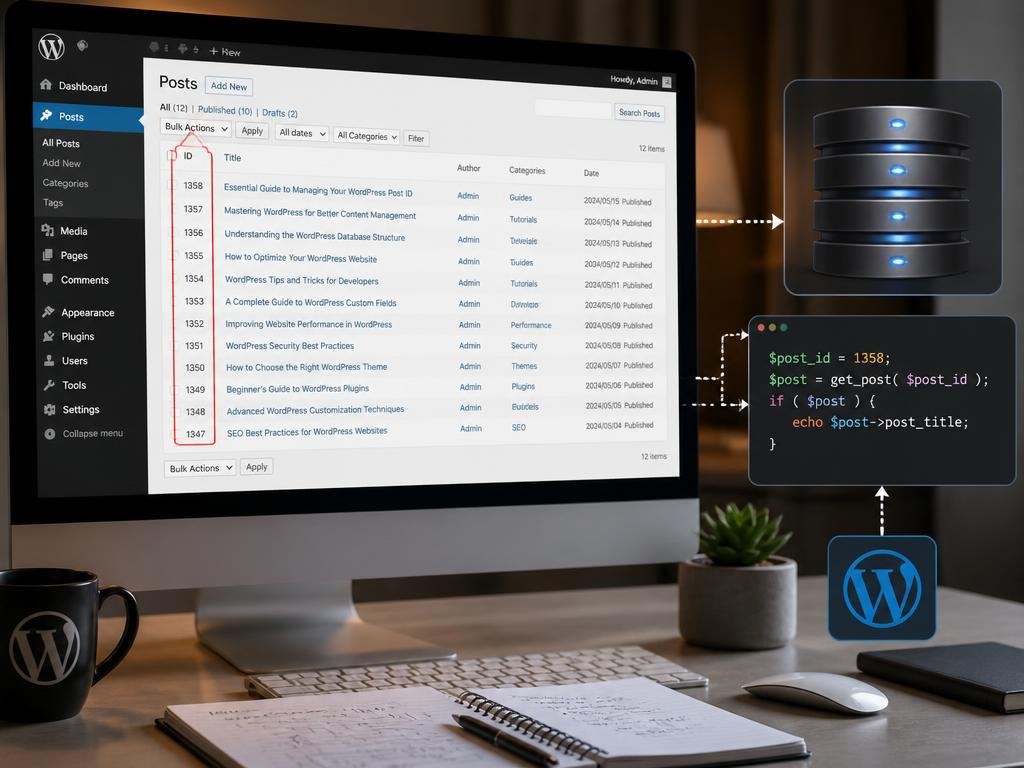
Understanding how to handle your wordpress post id is a fundamental skill for any site administrator looking to maintain a clean database structure. Every piece of content you publish receives a unique identifier in the MySQL database, which acts as a primary key for retrieving and organizing your digital assets efficiently. By mastering these identifiers, you can resolve potential display errors, improve your linking strategies, and streamline your administrative tasks. Whether you are a developer or a content creator, knowing where to find these digits helps you maintain full control over your website architecture daily.
Managing these identifiers might seem complex, but it simplifies your workflow once you grasp the underlying logic. Beyond basic organization, manipulating these keys correctly ensures your permalinks function perfectly while preventing common database conflicts. As we explore advanced techniques for identification and usage, you will discover that precise management leads to better site performance. From identifying media attachments to troubleshooting specific page templates, these technical details provide the foundation for a professional, stable environment. Keep reading to unlock the strategies needed to harness your database identifiers and elevate your overall site management capabilities significantly.
Locating your unique database identification numbers
The most straightforward method to view your identification digits is directly within the dashboard. When you hover over an edit link for a specific page or article, your browser typically displays the URL string containing the numeric reference. This quick visual confirmation allows you to distinguish between various content types without needing external plugins or complex SQL queries. Understanding this baseline is crucial for anyone seeking to optimize their workflow and perform rapid content updates without constantly refreshing the primary dashboard screens while navigating large websites.
💡 Pro Tip for Quick Access
If you frequently need to check identification numbers, consider using a simple management plugin. Such tools add a dedicated column to your post lists, allowing you to see every numeric key at a glance without hovering over links. This saves precious time when managing large content libraries or setting up complex shortcodes for your layouts.
For those who prefer not to install additional software, customizing the administration screen via the theme functions file remains a viable alternative. By injecting a short code snippet, you can force the dashboard to display these figures permanently in the interface. This approach maintains a lightweight environment while providing the necessary data for your daily operations, ensuring that your backend remains uncluttered, professional, and optimized for your specific administrative needs throughout your site management journey.
Common challenges and database maintenance solutions
Occasionally, you might encounter issues where sequences of identifiers appear broken or skipped, which often happens after deleting bulk content. While this behavior is normal for MySQL databases, it can cause confusion for beginners who expect perfectly chronological numbering. If you find your system behaving erratically, you might investigate esim technology compatibility as a parallel example of how modern digital systems rely on specific backend configurations to operate smoothly. Keeping your database clean is essential for long-term health.
The integrity of your database relies on understanding that each entry requires a permanent, non-repetitive numeric anchor to maintain stable communication between the server and the front-end display.
Maintaining these records ensures that your search engine indexing remains accurate and that internal site links do not break unexpectedly over time. When migrating data or performing heavy updates, always ensure that your primary keys remain intact during the export process. Indeed, ignoring these foundational elements during routine maintenance can lead to site-wide errors that take hours to resolve manually, especially when dealing with heavy traffic or complex custom post types built on unique wordpress post id structures.
Advanced technical implementation for custom themes
Developers often require these keys to trigger custom functions, such as dynamic template loading or specific meta data retrieval. By calling the global object or using built-in template tags, you can output these digits directly into your theme code. This flexibility allows for highly dynamic page layouts where content behaves differently based on its unique origin. If you have ever wondered about the industrial processes behind complex products, you might also find interest in genesis manufacturing locations to understand how standardized origins translate to superior structural quality and reliability.
⚠️ Warning Regarding Database Queries
Never modify your database tables directly via SQL commands unless you have performed a full backup. An incorrect operation on your identifiers can permanently orphan media files, break internal links, and render your posts inaccessible. Always prioritize safety and staging environments before running any automated scripts that alter your primary site keys.
Implementing conditional logic based on these keys is a powerful way to personalize visitor experiences. For example, you can create specific sidebars or promotional banners that only appear on articles with a particular range of numeric identifiers. This level of control distinguishes professional developers from casual users, enabling them to build websites that are not only aesthetically pleasing but also highly functional and structurally sound, providing a seamless experience for both administrators and end users who navigate the site daily.
Optimizing site architecture through systematic labeling
Systematic labeling within your backend improves content discovery and simplifies routine troubleshooting. When you categorize your entries by keeping track of these markers, you create an intuitive map of your entire digital presence. Think of this process as similar to the effort required when exploring genesis vehicle production where every part must fit perfectly for the final result to succeed. By maintaining order in your backend, you ensure that every part of your website communicates effectively with the database to deliver fast, accurate results to your audience.
Key Takeaways for Effective Management
- Always verify identifiers before performing bulk updates.
- Use reliable plugins if you prefer a visual interface.
- Backup your database before making structural changes.
- Keep your documentation updated for future team members.
If you find that your documentation is lacking, take a moment to record which identifiers correlate to your most important landing pages. This simple habit prevents headaches during future site redesigns or server transitions. Moreover, teaching your content team how to retrieve these numbers can reduce dependency on technical support for simple tasks. By empowering your users with basic knowledge of database keys, you foster a culture of technical competence that benefits the entire organization while keeping your digital assets secure and well-organized for future expansion and maintenance efforts.
Integrating multimedia content with numeric identifiers
Managing media files effectively involves more than just uploading images; it requires understanding how these files relate to your content entries. Each attachment is a post in its own right, possessing a unique identifier that links it to your text articles. If you are learning about media management, you might consider recording audio sessions as a way to enrich your content library, provided you keep your attachment IDs organized within the backend. This practice ensures your media assets are always searchable, scalable, and correctly referenced throughout your long-term publishing strategy.
Summary of Workflow Benefits
Proper management of your identification system directly correlates to faster site speed, fewer broken links, and a much smoother administrative experience. Whether you are scaling an enterprise site or a personal blog, taking the time to master these small technical details will pay off in the long run through increased efficiency and reduced downtime during critical updates or migrations.
Finally, remember that the most effective sites are those built upon a clean, logical, and well-maintained data foundation. By consistently auditing your content and keeping track of your unique markers, you ensure that your platform remains agile in a fast-paced digital environment. Continue exploring advanced methods to automate these tasks, allowing you to focus more on creative output rather than repetitive manual data entry. Your commitment to maintaining a clean database structure today will undoubtedly save you time, effort, and frustration as your website continues to grow and evolve over the coming months and years ahead.

Commentaires désactivés